AI In A Box: Architectural Overview
Introduction
The intent of this post is to level set and talk through the architecture behind the AI In A Box quick start I’ve developed. This is also part of a longer running post calling out all the various technology and components involved.
We talk through the components required to stand up the application and, perhaps more importantly, talk through the required permissions for the services to talk to each other in the most secure manner and leveraging the least privileged principle.
There are effectively four main functional areas that will be deployed:
- A Front End backed by Azure Static Apps
- A Back End containing an Azure Function
- An Azure Foundry resource and the necessary components
- A centralized logging Resource Group for all the resources
Frontend
For the Front End an Azure Static Web App was chosen. The Static Web App is configured to leverage the free tier for cost considerations and simplicity. The Front End is written in Java Script and is open to the public while also connected to a centralized Log Analytics workspace via a dedicated Application Insights instance.
Since this is open to the public we will require an Azure Function with a Managed Identity as the request handler for any calls to the Foundry Service. This limitation is at the Foundry level as we wouldn’t want an unauthenticated user or system to exploit our model and agent that is hosted in Foundry.
As such we will need to call a back end….
Backend
The backend to this application is an Azure Function running on the newer Azure Functions Flex Consumption plan. We also will need a storage account and associated container to upload our source code into. In our case we going to write the API in C#.
Since we are using the Flux Consumption plan there will be an Event Grid additional created in the case of requiring blog storage triggers.
This will be backed by a dedicated Application Insight instance which will then consolidate logs and metrics to a shared instance of Log Analytics.
As mentioned earlier this Azure Function will require a Managed Identity to be associated with it. I’ve chosen System Assigned as that is the most granular.
We will also create the Storage Account for Azure Function. As such we will need to assign this identity the Blob Data Data Owner role. For more information on why we need to do this check out this MS Learn article.
So the Azure Function now has the ability to access the Storage Account we’ve created, now we need to give it access to our Foundry instance. The Agent within Foundry is considered at the Data tier. As such we will need to give the Azure Function’s identity an appropriate permissions. We will be giving it the Cognitive Services User role. Since Foundry is a subtype of Cognitive Services this should allow our Azure Function to authenticate and read the available agents within the Foundry project.
Foundry Resources
The Foundry resources that are being deployed contained a new instance of Foundry, which if you weren’t aware Foundry is a resource of type Cognitive Services. As such we are technically going to be deploying a Cognitive Services Account with the appropriate type to indicate a Foundry instance.
After this we will deploy a project that will be contained within the Cognitive Services Account. After this we will also create a gpt model within the project. The model will only be scoped to the project that we created.
For a more in depth overview of this section feel free to check out my post Azure Foundry CI/CD which goes more in depth on the individual components and will talk through how the Agent within Foundry will deployed. At the time of this writing the Agent is not defined as part of the infrastructure within the defined Foundry resource.
The decision to hook up at App Insights at this time was on purpose as that feature is currently in preview.
Logging Resources
Nothing fancy here. Just an instance of Log Analytics that will be the centralized platform for all of our logging.
Architecture Diagram
So let’s put all this together visually and see what we have:
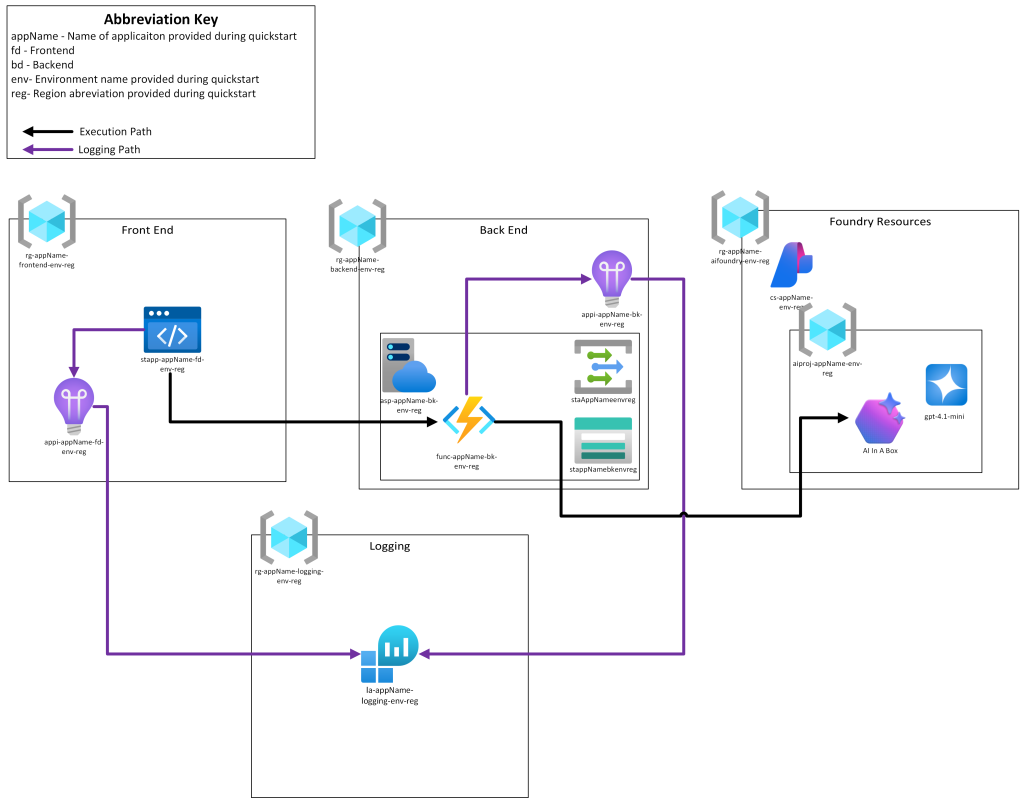
We can see our logging path in purple and our information flow in black. Our Static Web App will call the Azure Function which will then leverage it’s Managed Identity to make a call to Foundry, the Event Grid, Storage Account, and App Service Plan, are infrastructure requirements Azure Functions infrastructure. This Azure Function will then call our Foundry Endpoint and return the appropriate response back up through our application stack.
Conclusion
Hopefully this has provided a high level overview of how the AI In A Box solution has been architected and leveraging a muti-tier stack
Discover more from John Folberth
Subscribe to get the latest posts sent to your email.